
Invoice Extraction Fails on the Template You Didn't Train On
Your invoice extraction model hits good F1 in testing, ships, and then the first invoice from a new vendor comes in and it misses the total, grabs the PO number as the invoice number, or mangles the line-item table. Nothing is wrong with the model. The problem is what it learned: positions, not fields.
Invoices have no canonical layout. Every vendor designs its own template, so the set of layouts your model meets in production is effectively unbounded, and new ones keep arriving. A model trained on one template, or on a few thousand documents that share a handful of templates, learns where the total usually sits rather than what a total is. It looks accurate right up until it hits a layout it was never trained on, which in production is most of them.
So the real test for an invoice model is not scan quality or handwriting. It is whether it can read a structure it has never seen: the invoice number top-right instead of top-left, the quantity column before the description instead of after. This post is about how to train for that with synthetic invoice data, and the one evaluation that actually predicts how a model behaves on vendor number 1,001.
Held-Out-Template Evaluation: The Only Split That Predicts Production
Before talking about training data, fix the measurement. The standard random train/test split is close to meaningless for invoices. If the same template appears on both sides of the split, your test set is measuring layout memorization and reporting it as accuracy. Models post excellent F1 under that protocol and then drop hard on templates outside the training set, which is most of what they see in production.
The honest protocol is held-out template: every template in your corpus appears in either the training split or the test split, never both. Test-set F1 under this protocol measures the thing production will measure: can the model find the total on a layout it has never seen? This is not a new idea. Generalizing across unseen vendor templates is well established in the document-AI literature. It is simply underused, because random splits flatter your numbers and held-out splits tell you the truth.
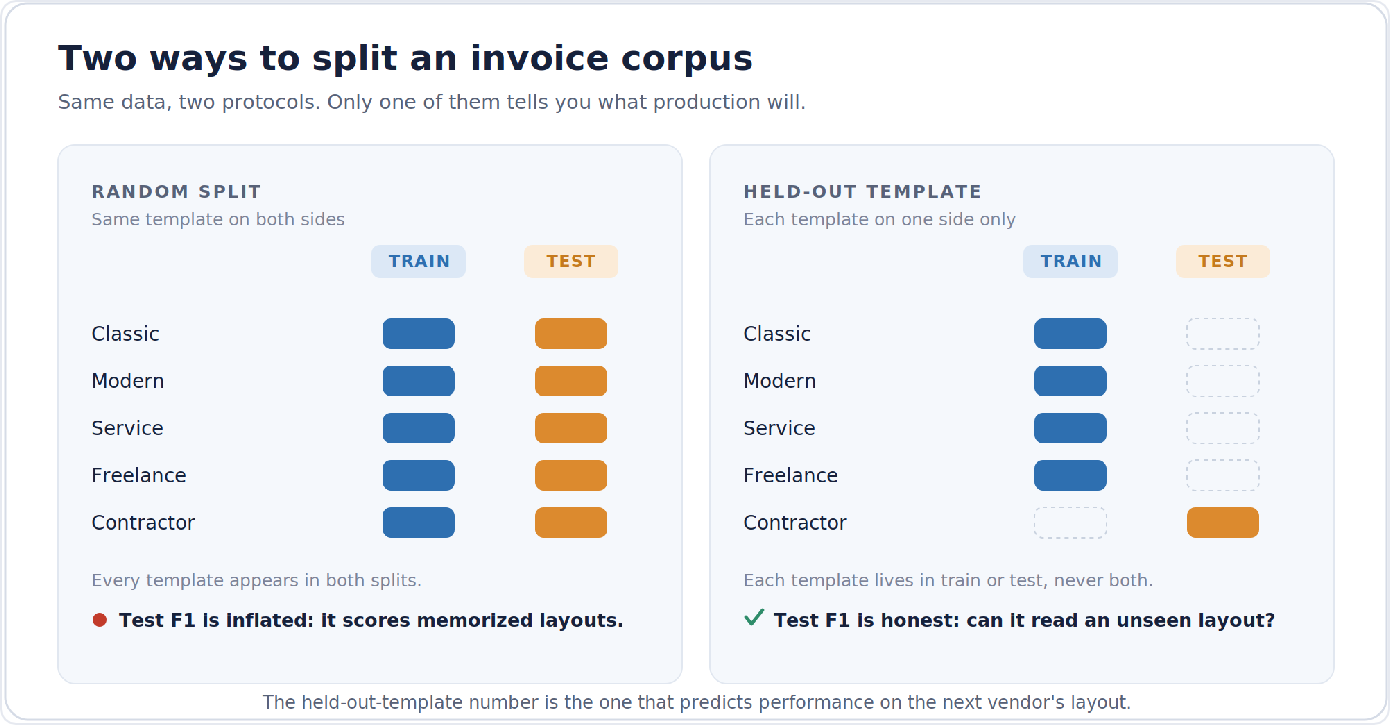
Once you adopt that eval, the training-data requirement falls out immediately. You need the same semantic schema expressed across genuinely different page structures, with enough structural contrast that the positional shortcut stops being learnable.
Five Templates, One Schema
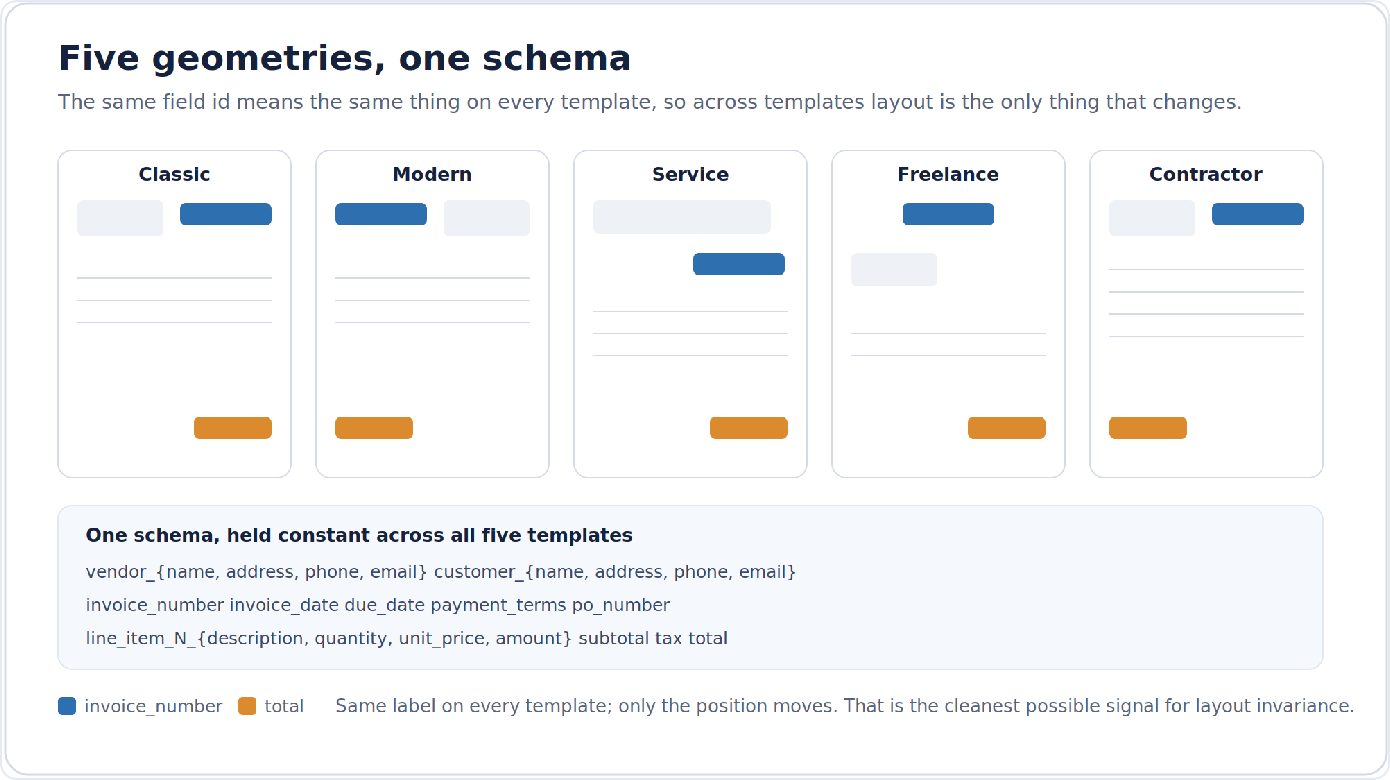
SymageDocs ships five structurally distinct invoice templates, each a different answer to the question of how a business lays out a bill:
| Template | Form ID | Layout character |
|---|---|---|
| Classic Commercial Invoice | invoice_classic | Traditional ledger styling, dense header block |
| Modern Commercial Invoice | invoice_modern | Contemporary layout, restructured vendor / customer placement |
| Professional Services Invoice | invoice_service | Services billing with engagement-oriented line items |
| Freelance Invoice | invoice_freelance | Lightweight single-proprietor format |
| Contractor Invoice | invoice_construction | Construction-trade invoice with trade-specific line structure |
Each is a single-page form with roughly 50 to 60 annotated fields. Across all five, the semantic schema is held constant: a vendor block (name, address, phone, email), a customer block, the invoice metadata cluster (invoice_number, invoice_date, due_date, payment_terms, po_number), a line-item table (line_item_N_description, line_item_N_quantity, line_item_N_unit_price, line_item_N_amount), and the totals stack (subtotal, tax, total).
That constancy is the point. The same field id means the same thing on every template, so when you train across templates, layout is the only thing varying. This is the cleanest possible signal for layout invariance: five different geometries, zero label noise between them.
Coherent Values: Why the Line Items Have to Reconcile
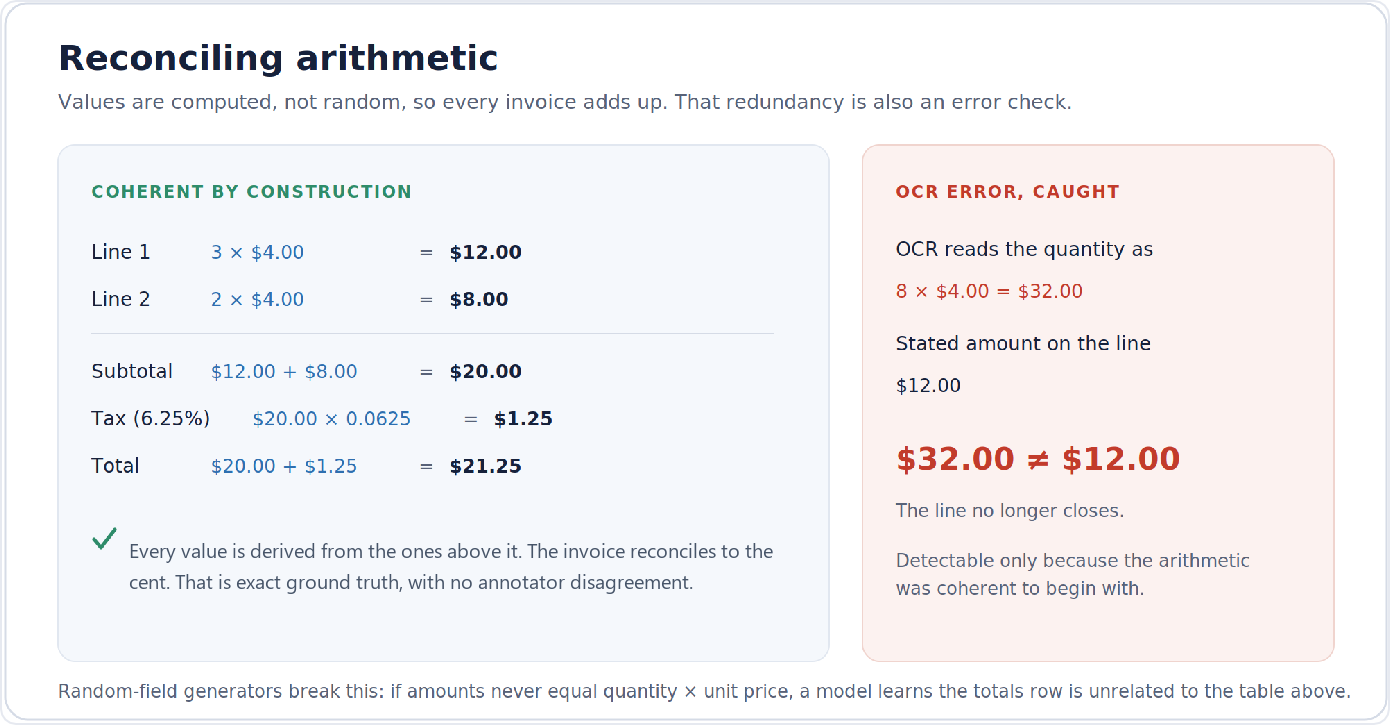
Invoice extraction shares a property with tax forms: the document is full of arithmetic, and downstream consumers check it. Line amount should equal quantity times unit price. The subtotal should be the sum of the line amounts. The total due should be subtotal plus tax at a plausible rate for the vendor's state.
SymageDocs invoices are generated with that arithmetic intact. Quantities and unit prices are drawn first, amounts and subtotals are computed from them, and tax is applied at the vendor-state rate, so the totals reconcile to the cent. Random-field generators get this wrong in a way that quietly poisons training: a model trained on invoices where the column never sums learns that the totals row is unrelated to the table above it. Three-way consistency between quantity, unit price, and amount is also exactly the redundancy that lets a production model (or a validation layer behind it) catch its own OCR errors. A 3 misread as an 8 in the quantity column is detectable only because the arithmetic stops working.
Every generated invoice ships with full ground truth: structured JSON with every field value, per-page FUNSD annotations with entity labels and linking, and bounding boxes computed from the template geometry rather than from a post-hoc OCR pass. Line-item tables are the classic weak spot of human annotation (row boundaries, column assignment, multi-line descriptions), and generated labels carry no annotator disagreement. Read our article Generate a Synthetic FUNSD Dataset for LayoutLMv3 Fine-Tuning for the annotation format in detail.
Generating the Corpus
The five templates share the invoice form family, so the whole corpus is a short script:
# pip install symagedocs
from symagedocs import Client
from symagedocs._errors import ConfirmationRequired

client = Client()  # reads SYMAGEDOCS_API_KEY from the environment

invoices = [f for f in client.forms.list() if f.family == "invoice"]
for f in invoices:
    print(f"{f.id:24s} {f.name} ({f.field_count} fields)")

jobs = {}
for form in invoices:
    params = dict(
        quantity=300,
        output_formats=["pdf_typed", "png_typed"],
        degradation_profile="mixed",  # scans, faxes, phone photos, clean
        seed=2026,
    )
    try:
        job = client.generate.create(form.id, **params)
    except ConfirmationRequired as exc:
        print(f"{form.id}: confirming spend of {exc.cost} credits")
        job = client.generate.create(form.id, confirmed_credits=exc.cost, **params)
    jobs[form.id] = job.job_id

for form_id, job_id in jobs.items():
    client.generate.wait(job_id)
    client.generate.download(job_id, "dataset", f"./{form_id}.zip")
The degradation_profile knob matters more for invoices than for almost any other document type. Production invoices arrive as email PDFs, flatbed scans, fax relics, and phone photos taken on a warehouse floor. The mixed profile spreads the batch across those capture conditions while keeping the same underlying ground truth.
For the held-out-template protocol, train on four form IDs and evaluate on the fifth, rotating through all five assignments. Before splitting anything, spot-check the FUNSD annotations straight out of a downloaded bundle. Every invoice ships one FUNSD JSON per page under annotations/funsd/:
import json, zipfile

with zipfile.ZipFile("./invoice_modern.zip") as bundle:
    funsd_names = sorted(
        n for n in bundle.namelist() if "_funsd" in n and n.endswith(".json")
    )
    for name in funsd_names[:5]:
        doc = json.loads(bundle.read(name))
        entities = doc["form"]  # FUNSD entities: {id, text, box, label, words, ...}
        answers = [e for e in entities if e["label"] == "answer"]
        print(f"{name}: {len(entities)} entities, {len(answers)} values")
Two practical notes. First, hold the seed fixed and your corpus is exactly reproducible. When you bisect a model regression six weeks from now, you can rebuild the precise training set that produced any checkpoint. Second, if you have any real invoices, they belong in the test set, not the training set: synthetic templates train the invariance, real vendor layouts measure whether it transferred.
What Five Templates Buy You, and What They Don't
Honest scoping: five templates is a structural-variety floor, not a complete invoice universe. What they provide is controlled contrast (identical schema, five geometries, coherent values, exact labels) that random template collections cannot, because real invoice datasets confound layout with vendor, industry, scan quality, and annotation noise all at once.
Five templates will not enumerate the production invoice distribution. Nothing will. What they do is make the positional shortcut unlearnable, which is what forces the model onto the representation that survives template 1,001.
Why not just use a free dataset with more templates?
It is a fair question and worth answering directly. Public synthetic invoice datasets exist, some with far more than five templates, and if raw template count were the goal you would start there. But template count is not the constraint that matters most for training a production extractor, and it is often the one dimension where free collections are strongest. Where they tend to fall short is in three places that matter more.
Where free template collections fall short
Coherent values
Many synthetic generators populate fields with randomized, independently drawn numbers, so the line amounts do not equal quantity times unit price, the subtotal does not sum the lines, and the tax is arbitrary. A model trained on that learns that the totals row is unrelated to the table above it, and you forfeit the arithmetic redundancy that lets a production system catch its own OCR errors. SymageDocs draws quantities and unit prices first and computes amounts, subtotals, and state-rate tax from them, so every invoice reconciles to the cent.
Annotation depth
Lighter collections ship a bounding box and a coarse class label per region. SymageDocs ships per-page FUNSD annotations with entity labels and linking, across 50 to 60 densely labeled fields per template under one constant schema, with boxes computed from template geometry. That is the difference between training a region detector and training a field extractor.
Reproducible, on-demand generation
A fixed public dump is fixed. With a seeded API you can rebuild the exact training set behind any checkpoint months later, scale the corpus when you need more, and spread it across capture conditions with the degradation profile while holding ground truth constant.
More templates buys breadth of layout. It does not buy coherent arithmetic, dense linked labels, or reproducible scale, and those are what a model actually needs to generalize. If you already have a broad free collection, the productive move is to use it alongside controlled synthetic data, not instead of it, and to keep your real invoices in the test set where they measure whether the invariance transferred.
What five templates do not provide is the long tail of production weirdness: the vendor whose invoice is a spreadsheet export, the one who puts the remittance slip on top. When a particular vendor's layout matters enough to train on directly, you can upload that template to SymageDocs and generate synthetic invoices in that exact layout, with the same full ground truth the built-in five ship with, including per-page FUNSD annotations with entity linking and bounding boxes from template geometry. The genuinely unseen remainder beyond that is what your real-document test set and production monitoring are for. Train on controlled variety, including your own, and evaluate on uncontrolled reality, the same division of labor as everywhere else in synthetic document data.
Getting Started: Your First Synthetic Invoice Dataset
The 250 free credits every SymageDocs account starts with buy a first look at the structural variety. One invoice from each of the five templates with the mixed degradation profile runs 148 credits (the roughly 50-to-60-field templates price at 22 to 24 credits each typed, times 1.25 for mixed), full ground truth included. That leaves around 100 credits in the account, so the look costs you nothing and you still have room to experiment. It is enough to put all five geometries and their FUNSD annotations in front of your parser before committing to a training corpus. The 300-per-template run shown above is paid-tier scale, about 44,250 credits.
Filter the forms catalog to family == "invoice" and look the templates over. The held-out-template number is the one worth knowing before your next vendor onboards.
Frequently Asked Questions
What is held-out-template evaluation for invoice extraction? A train/test protocol where every invoice template appears in either the training split or the test split, never both. It measures whether a model can extract fields from a layout it has never seen, which is what production depends on. Random splits, where the same template lands on both sides, measure layout memorization instead.
How do you train an invoice extraction model to be layout-invariant? Train on the same semantic schema expressed across structurally different templates, with enough contrast that the model cannot rely on field position. When layout is the only variable that changes between templates, the model is pushed onto field concepts rather than coordinates.
How many synthetic invoice templates does SymageDocs provide? Five structurally distinct templates (classic commercial, modern commercial, professional services, freelance, and contractor), each with roughly 50 to 60 annotated fields, all sharing one constant schema.
Can I generate synthetic invoices from my own vendor templates? Yes. Alongside the five built-in templates, SymageDocs supports uploading your own vendor forms and generating synthetic invoices in those layouts, with the same full ground truth the built-in five ship with, including per-page FUNSD annotations with entity linking. That lets you train directly on the specific templates that matter to your pipeline, not just the built-in five.
Why use SymageDocs instead of a free synthetic invoice dataset with more templates? Template count is often where free datasets are strongest, but it is not the main constraint for training a production extractor. Three differences matter more: value coherence, annotation depth, and reproducible on-demand generation. A broad free collection and controlled synthetic data are complementary; use both, and keep real invoices in the test set.
What ground truth ships with each synthetic invoice? Structured JSON with every field value, per-page FUNSD annotations with entity labels and linking, and bounding boxes computed from the template geometry rather than from a post-hoc OCR pass. The arithmetic also reconciles to the cent.
How much does it cost to try? Every account starts with 250 free credits. One invoice from each of the five templates with the mixed degradation profile costs 148 credits, leaving roughly 100 credits for further experiments.
Start for Free
Now, for a limited time only, start with 1,000 free credits. The SymageDocs SDK gets you all five templates and their FUNSD annotations today, with room left to experiment before you commit to a training corpus.
Ready to generate synthetic document data?
Start with 250 free credits. No credit card required.
Start for Free